| Previous
|
What happens if the proctor rejects your prerequisite check?
|


Survey Option
A Survey button is available, allowing you to provide feedback on the overall experience. When the Survey button is clicked, a feedback pop-up titled Rate your Session appears, like the one shown in the image.
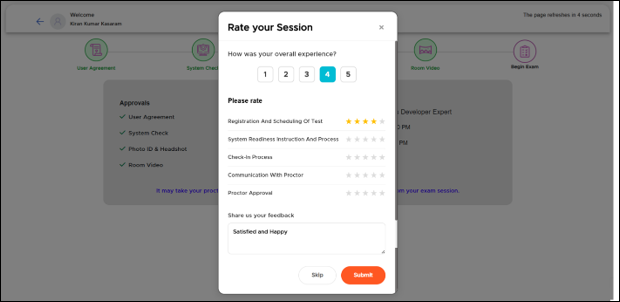
This popup allows users to evaluate their overall experience and provide feedback.
-
Overall Experience Rating
Users can select a rating from 1 to 5, where:
1 = Very poor experience
5 = Excellent experience
-
Detailed Rating Section
Users can rate specific aspects using star icons (typically 1–5 stars).
-
Feedback Text Box
A text area with placeholder Type here… you can enter Comments, Suggestions, Issues faced during the session etc.
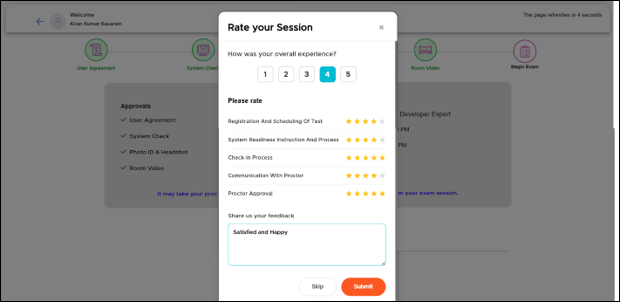
You can either submit or skip the survey. To skip the survey, click the Skip button.
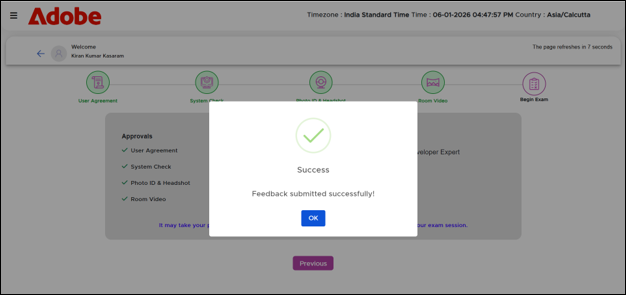
After providing your feedback, click the Submit button. A success message will then be displayed on the screen, as shown below.
 Other Topics