Photo ID Submission Guidelines
To ensure successful verification, please follow these steps during capture your Photo ID:
-
Use a Valid Government-Issued ID
-
Below listed are the acceptable IDs for photo identification.
-
Passport: National passports issued by any country.
-
Driver’s License: State, provincial, or national driving licenses.
-
National ID / Citizenship Card: Examples include - Aadhaar (India), NRIC (Singapore), MyKad (Malaysia), EU National IDs (Germany, France, Spain, etc.)
-
Passport Card: Accepted from countries such as the USA and those in Europe.
-
The ID must be current and not expired.
-
-
-
Ensure Good Lighting
-
Capture the photo in a well-lit area to avoid shadows or glare.
-
Natural light or soft indoor lighting works best.
-
Keep the ID Flat and Fully Visible
-
Place the ID on a flat surface or hold it steadily.
-
Make sure all corners of the ID are visible and not cropped.
-
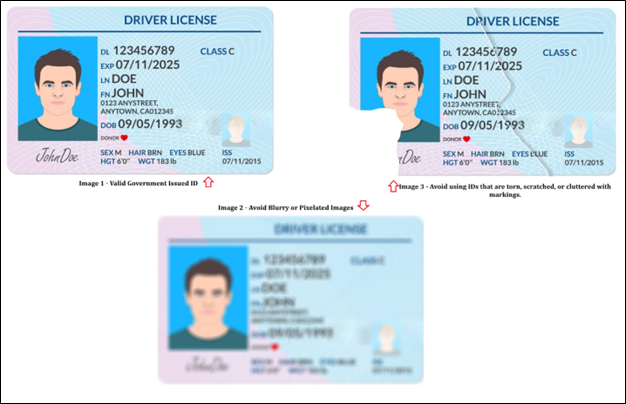
Avoid Blurry or Pixelated Images
-
Use a high-resolution camera.
-
Hold the camera steady and ensure the image is sharp and clear.
-
Remove Obstructions
-
Do not cover any part of the ID with fingers, stickers, or other objects.
-
Ensure your name, photo, and ID number are clearly visible.
-
Match the Name on the ID with Your Registration Legal name
-
The name on the ID must match the name used for the assessment registration/Legal name.
-
Capture in a Neutral Background
-
Avoid busy or patterned backgrounds that may interfere with ID recognition.
-
Do Not Use Edited or Filtered Images
-
Upload the original photo without any enhancements or modifications.
-
Check Before Submitting
-
Review the image to confirm clarity and completeness before uploading.
-
ID from mobile phone or any electronic device.
-
Do not produce ID from your Phone or from any electronic device
You should use Physical ID for capturing during the assessment.
Use the image below as a guide to understand the recommended practices and common mistakes when capturing your photo ID.
Pre-Assessment Phase : Photo ID & Headshot