Raise Tickets
-
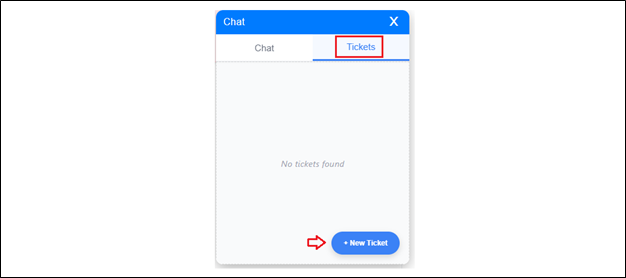
If you encounter any issues before or during the assessment, you can raise a ticket by clicking the Ticket tab.
-
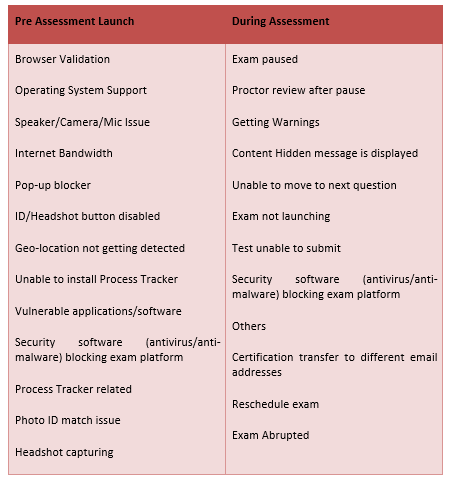
The available ticket categories will vary depending on your current stage in the assessment process.
-
-
Click the New Ticket button to begin.
-
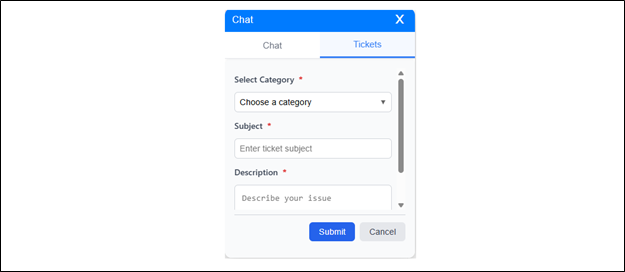
A form will appear where you can:
-
Select a category for your issue.
-
If you are about to begin the test, you will see a different set of options than if you are already in the test or have launched it.
-
Enter a subject line.
-
Provide a detailed description of the issue.
-
-
Complete all required fields in the form. Click the Submit button to proceed.
-
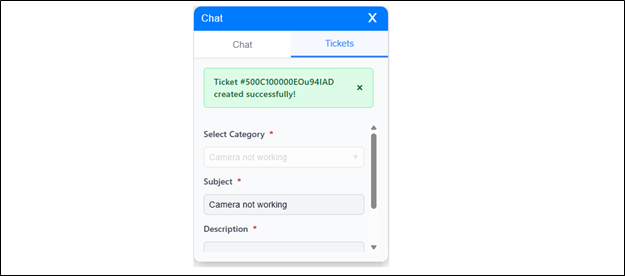
A confirmation message will appear, indicating that your ticket has been successfully generated.
The system supports creating multiple tickets simultaneously. The table below offers a quick overview of the ticket categories available before and during the assessment.